Ilman Iqbal's Blog
Kubernetes Deployment Strategies, Health Probes, Resource Limits, Persistent Volumes and Storage Classes
Learn how to configure Deployment strategies for zero-downtime updates, use health probes (liveness, readiness, startup) to keep your applications self-healing, set resource requests and limits for CPU, memory, and ephemeral storage, and attach persistent storage using PersistentVolumeClaims and StorageClasses.
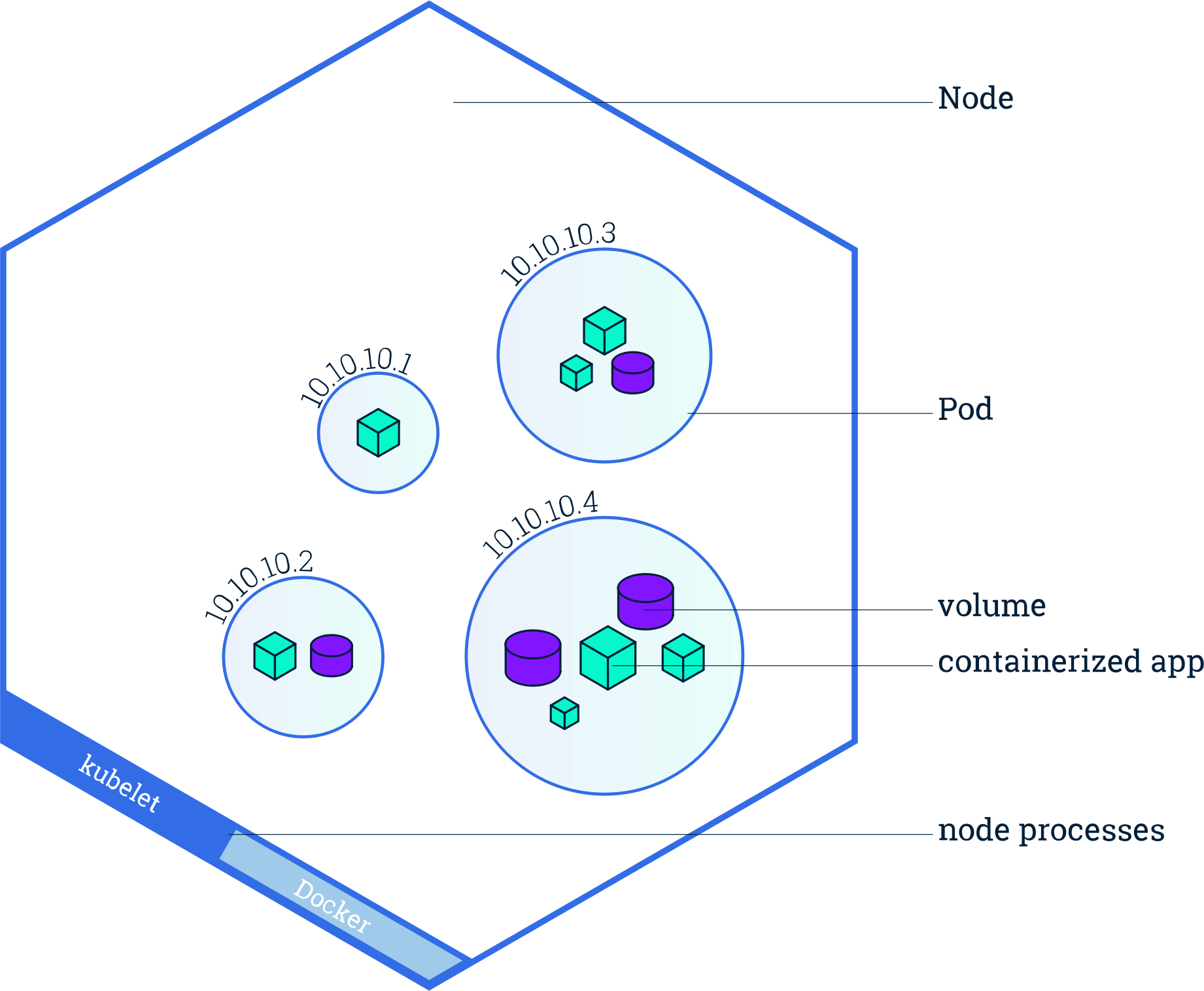
Full Deployment manifest example
To show how all the concepts in this post fit together, here is a complete Deployment manifest that uses deployment strategies, revision history, image pull policy, health probes, resource limits, and a PersistentVolumeClaim — all in one file:
apiVersion: apps/v1
kind: Deployment
metadata:
  name: identity-server
  namespace: identity
spec:
  replicas: 3
  revisionHistoryLimit: 5                          # Keep last 5 ReplicaSets for rollback
  strategy:
    type: RollingUpdate                            # Gradually replace Pods (zero downtime)
    rollingUpdate:
      maxSurge: 1                                  # Allow 1 extra Pod during update
      maxUnavailable: 0                            # Never take a running Pod down during update
  selector:
    matchLabels:
      app: identity-server
  template:
    metadata:
      labels:
        app: identity-server
    spec:
      containers:
      - name: identity-server
        image: identity-server:2.1.0               # Versioned tag (not :latest)
        imagePullPolicy: IfNotPresent               # Pull only if image is missing on the node
        ports:
        - containerPort: 8443
          name: https
        resources:
          requests:
            cpu: "250m"                            # 0.25 vCPU guaranteed
            memory: "512Mi"                        # 512 MiB guaranteed
            ephemeral-storage: "256Mi"             # 256 MiB disk for logs/temp files
          limits:
            cpu: "1000m"                           # Max 1 vCPU (throttled beyond this)
            memory: "1Gi"                          # Max 1 GiB (OOMKilled beyond this)
            ephemeral-storage: "1Gi"               # Max 1 GiB (Pod evicted beyond this)
        startupProbe:                              # Handles slow JVM/identity-server boot
          httpGet:
            path: /healthz
            port: 8443
            scheme: HTTPS
          initialDelaySeconds: 10
          periodSeconds: 5
          failureThreshold: 30                     # 30 x 5s = up to 150s to start
        livenessProbe:                             # Restarts container if stuck/dead
          httpGet:
            path: /healthz
            port: 8443
            scheme: HTTPS
          initialDelaySeconds: 0                   # Starts immediately after startup probe succeeds
          periodSeconds: 10
          failureThreshold: 3
        readinessProbe:                            # Removes Pod from Service if not ready
          httpGet:
            path: /ready
            port: 8443
            scheme: HTTPS
          initialDelaySeconds: 0
          periodSeconds: 5
          failureThreshold: 3
        volumeMounts:
        - name: server-config
          mountPath: /opt/identity/etc/init
      volumes:
      - name: server-config
        persistentVolumeClaim:
          claimName: identity-server-config
---
apiVersion: v1
kind: PersistentVolumeClaim
metadata:
  name: identity-server-config
  namespace: identity
spec:
  accessModes:
    - ReadWriteOnce
  storageClassName: local-path
  resources:
    requests:
      storage: 1Gi
The sections below explain each of these features in detail.
Deployment Strategies
Kubernetes supports different strategies for updating Pods in a Deployment. The strategy determines how old Pods are replaced with new ones.
Recreate
spec:
  strategy:
type: Recreate- Deletes all existing Pods first, then creates new ones.
- Causes downtime during the update.
- Simple but not suitable for production workloads that need high availability.
Use when the application cannot run multiple versions at the same time (e.g., database migrations that require exclusive access).
RollingUpdate (default)
spec:
  strategy:
    type: RollingUpdate
    rollingUpdate:
      maxSurge: 25%
maxUnavailable: 25%- Default strategy in Kubernetes.
- Updates Pods gradually — no downtime.
| Field | What it does | Example (replicas = 4) |
|---|---|---|
maxSurge |
Number of extra Pods allowed during the update | 25% → 1 extra Pod can be created |
maxUnavailable |
Number of Pods allowed to be unavailable | 25% → 1 Pod can go down |
Benefits: zero downtime, safer deployments, and automatic rollback if health checks fail.
Revision History Limit
spec:
revisionHistoryLimit: 10- Defines how many old ReplicaSets are kept for rollback.
- Default is
10.
Each Deployment update creates a new ReplicaSet. Old ones are preserved so you can roll back to previous versions.
Example
revisionHistoryLimit: 3→ only the last 3 versions are stored; older ones are deleted automatically.
| Trade-off | Impact |
|---|---|
| Lower value | Fewer rollback options, saves cluster resources |
| Higher value | More rollback flexibility, more storage usage |
Image Pull Policy
| Policy | Behaviour | Best for |
|---|---|---|
IfNotPresent |
Pull image only if not already on the node | Faster startup; local/dev clusters |
Always |
Always pull from registry, even if present | Ensures latest version; production with mutable tags |
Never |
Never pull; use only local images | Air-gapped environments or pre-loaded images |
containers:
- name: my-app
  image: my-app:latest
imagePullPolicy: Always:latest tag, Kubernetes defaults to Always.
For versioned tags (e.g., :1.2.3), the default is IfNotPresent.
Prefer explicit versioned tags in production to avoid surprises.
Health Probes — Liveness, Readiness, and Startup
Kubernetes uses probes to monitor the health of containers. Each probe type serves a distinct purpose.
Liveness Probe
Checks whether the container is still alive. If the probe fails, the container is restarted.
livenessProbe:
  httpGet:
    path: /healthz
    port: 8080
  initialDelaySeconds: 15
  periodSeconds: 10
failureThreshold: 3| Field | Purpose |
|---|---|
initialDelaySeconds |
Time to wait before the first check |
periodSeconds |
Interval between checks |
failureThreshold |
Consecutive failures before the container is restarted |
Use to detect stuck or deadlocked applications that are running but no longer functioning.
Readiness Probe
Checks whether the Pod is ready to serve traffic. If the probe fails, the Pod is removed from the Service load balancer (no traffic is sent to it), but it is not restarted.
readinessProbe:
  httpGet:
    path: /ready
    port: 8080
  initialDelaySeconds: 5
  periodSeconds: 5
failureThreshold: 3| Probe | On failure |
|---|---|
| Liveness | Container is restarted |
| Readiness | Pod is removed from Service endpoints (no traffic) |
Use to prevent sending traffic to Pods that are temporarily overloaded or still initializing dependencies.
Startup Probe
Used for slow-starting applications. While the startup probe is running, liveness and readiness probes are disabled. Once the startup probe succeeds, the other probes take over.
startupProbe:
  exec:
    command:
    - cat
    - /tmp/healthy
  initialDelaySeconds: 10
  failureThreshold: 30
  periodSeconds: 10
Use for heavy applications (e.g., identity servers, JVM-based apps) that need extended time to boot. Without a startup probe, a slow-starting container might be killed by the liveness probe before it finishes initializing.
How probes reach the Pod — kubelet calls the container directly
Health probes are sent directly to the Pod by the kubelet running on the node —
they never go through the Service. The kubelet calls the probe endpoint directly on the Pod's IP and container port:
http://<pod-ip>:<container-port>/healthzThe Service is completely bypassed during health checks. The Service is used only for application traffic:
- Ingress routes traffic to the Service using the Service port (not the container port).
- Service load-balances across ready Pods and forwards the request to the
targetPorton the Pod (port → targetPort). - Pod — the application inside must be running and listening on that container port to handle the request.
| Path | Used for | Goes through Service? |
|---|---|---|
| kubelet → Pod (direct, via pod IP) | Health probes (liveness, readiness, startup) | No |
| Client → Ingress → Service → Pod | Application traffic | Yes |
Resource Requests and Limits
Every container in a Pod can declare requests (guaranteed minimum) and limits
(maximum allowed). Kubernetes uses these to schedule Pods onto Nodes and enforce resource boundaries.
containers:
- name: my-app
  image: my-app:1.0
  resources:
    requests:
      cpu: "250m"
      memory: "256Mi"
      ephemeral-storage: "500Mi"
    limits:
      cpu: "500m"
      memory: "512Mi"
      ephemeral-storage: "1Gi"
CPU, Memory, and Ephemeral Storage explained
| Resource | Unit | Request (minimum guaranteed) | Limit (maximum allowed) | What happens on breach |
|---|---|---|---|---|
| CPU | m (millicores). 1000m = 1 vCPU |
Scheduler reserves this much CPU on a Node | Container is throttled (slowed down), not killed | Throttling — slower performance |
| Memory | Mi, Gi |
Scheduler reserves this much memory | Container is killed if it exceeds the limit | OOMKilled — container is terminated and restarted |
| Ephemeral Storage | Mi, Gi |
Disk space reserved for logs, temp files, emptyDir | Pod is evicted if it exceeds the limit | Pod eviction — Pod is removed from the Node |
How to decide resource values
Setting the right values requires understanding your application's actual resource consumption:
- Profile first, then set: Deploy the app without limits initially (or with generous limits).
Use monitoring tools to observe actual usage:
kubectl top pods -n <namespace> kubectl top nodes - Set requests to average usage: The request should reflect typical steady-state consumption. This is what the scheduler uses to place Pods on Nodes.
- Set limits to peak usage + headroom: The limit should accommodate bursts (e.g., startup spikes, occasional load). A good starting point is 1.5–2× the average.
- Iterate: Monitor in staging or production and adjust. Look for OOMKilled events (memory limit too low) or throttling (CPU limit too low).
What should resource values depend on?
| Factor | Impact on resources |
|---|---|
| Application type | CPU-intensive apps (APIs, ML) need more CPU; memory-intensive apps (caches, JVM) need more memory |
| Traffic patterns | Bursty traffic needs higher limits relative to requests; steady traffic can have tighter limits |
| Startup behaviour | JVM/heavy apps spike CPU and memory at boot — set limits to cover the startup peak |
| Number of replicas | More replicas = each can have lower resources; fewer replicas = each needs more |
| Node capacity | Requests must fit on available Nodes; oversized requests cause scheduling failures (Pending Pods) |
| Log and temp file volume | Applications that write large logs or temp files need adequate ephemeral-storage |
- No requests set: Pods are scheduled as best-effort and can be evicted first under resource pressure.
- Requests too high: Wastes cluster capacity; Pods may not schedule if Nodes look "full" even though actual usage is low.
- Limits too low: Causes OOMKill (memory) or heavy throttling (CPU), leading to slow or crashing Pods.
- No limits set: A single runaway container can starve other Pods on the same Node.
Persistent Volumes and Claims
Pods are ephemeral — when they restart, all data on disk is lost. Persistent Volumes (PV) and Persistent Volume Claims (PVC) let you attach durable storage that survives Pod restarts.
Mounting a PVC in a Deployment
spec:
  template:
    spec:
      containers:
      - name: my-app
        volumeMounts:
        - name: persistent-config
          mountPath: /opt/config
      volumes:
      - name: persistent-config
        persistentVolumeClaim:
          claimName: persistent-config-iam-admin-0
Creating a PersistentVolumeClaim
apiVersion: v1
kind: PersistentVolumeClaim
metadata:
  name: persistent-config-iam-admin-0
  namespace: my-namespace
spec:
  accessModes:
    - ReadWriteOnce
  resources:
    requests:
      storage: 1Gi
storageClassName: local-path| Access Mode | Meaning |
|---|---|
ReadWriteOnce |
Volume can be mounted as read-write by a single Node |
ReadOnlyMany |
Volume can be mounted as read-only by multiple Nodes |
ReadWriteMany |
Volume can be mounted as read-write by multiple Nodes |
Storage Classes
A StorageClass defines how storage is dynamically provisioned. When a PVC references a
StorageClass, Kubernetes automatically creates the underlying volume.
How dynamic provisioning works
- A PVC is created with a
storageClassName. - Kubernetes finds the matching StorageClass.
- The provisioner defined in the StorageClass creates the actual volume.
kubectl get storageclassIf no storageClassName is specified in the PVC, Kubernetes uses the cluster's default StorageClass
(marked with (default) in the output).
Common StorageClass types
| Environment | StorageClass | Notes |
|---|---|---|
| Local (k3s, k3d) | local-path |
Stores data on the node's disk. Not for production. |
| AWS | gp2, gp3 |
EBS-backed volumes |
| Azure | standard, premium |
Managed disk storage |
| GCP | standard, ssd |
Persistent Disk |
| On-prem | nfs, ceph, longhorn |
Shared or distributed storage |
hostPath is a local-only volume type for development. It maps a directory on the host into the Pod.
Unlike a PVC, it doesn't support dynamic provisioning, replication, or portability.
Summary
| Concept | Key takeaway |
|---|---|
| Recreate strategy | Causes downtime; deletes all Pods before creating new ones |
| RollingUpdate strategy | Zero downtime; gradually replaces Pods (default) |
revisionHistoryLimit |
Controls how many old ReplicaSets (rollback versions) are kept |
imagePullPolicy |
Controls when images are pulled from the registry |
| Liveness probe | Restarts the container if the application is dead or stuck |
| Readiness probe | Removes the Pod from Service endpoints if not ready for traffic |
| Startup probe | Handles slow-starting apps; disables other probes until success |
| Resource requests/limits | Controls CPU, memory, and ephemeral-storage allocation per container |
| PersistentVolumeClaim | Requests durable storage that survives Pod restarts |
| StorageClass | Defines how storage is dynamically provisioned |
Final notes & recommendations
- Always use
RollingUpdatestrategy in production to avoid downtime. ReserveRecreatefor cases where only one version can run at a time. - Set both
requestsandlimitsfor CPU, memory, and ephemeral-storage on every container. Profile actual usage before choosing values. - Configure liveness, readiness, and startup probes for all production workloads to enable self-healing and safe traffic routing.
- Use versioned image tags (e.g.,
:1.2.3) instead of:latestin production to ensure reproducible deployments.